I have a lot of audio and video files spread across disks and NAS shares: podcasts, voice notes, meeting recordings, lectures, and yes — legally ripped movies I actually own.
And I keep thinking the same thing:
Why the hell can’t I just search my own media library like it’s text?
So I started building ljudanteckning.
Repo: https://github.com/albinhenriksson/ljudanteckning
The elevator pitch (straight from the project’s soul):
Make your media library searchable: scan folders, split audio, transcribe in parallel across NVIDIA GPUs, then export subtitles and searchable text next to each original file.
Screenshot of the program running nicely on 11 Nvidia GPUs:
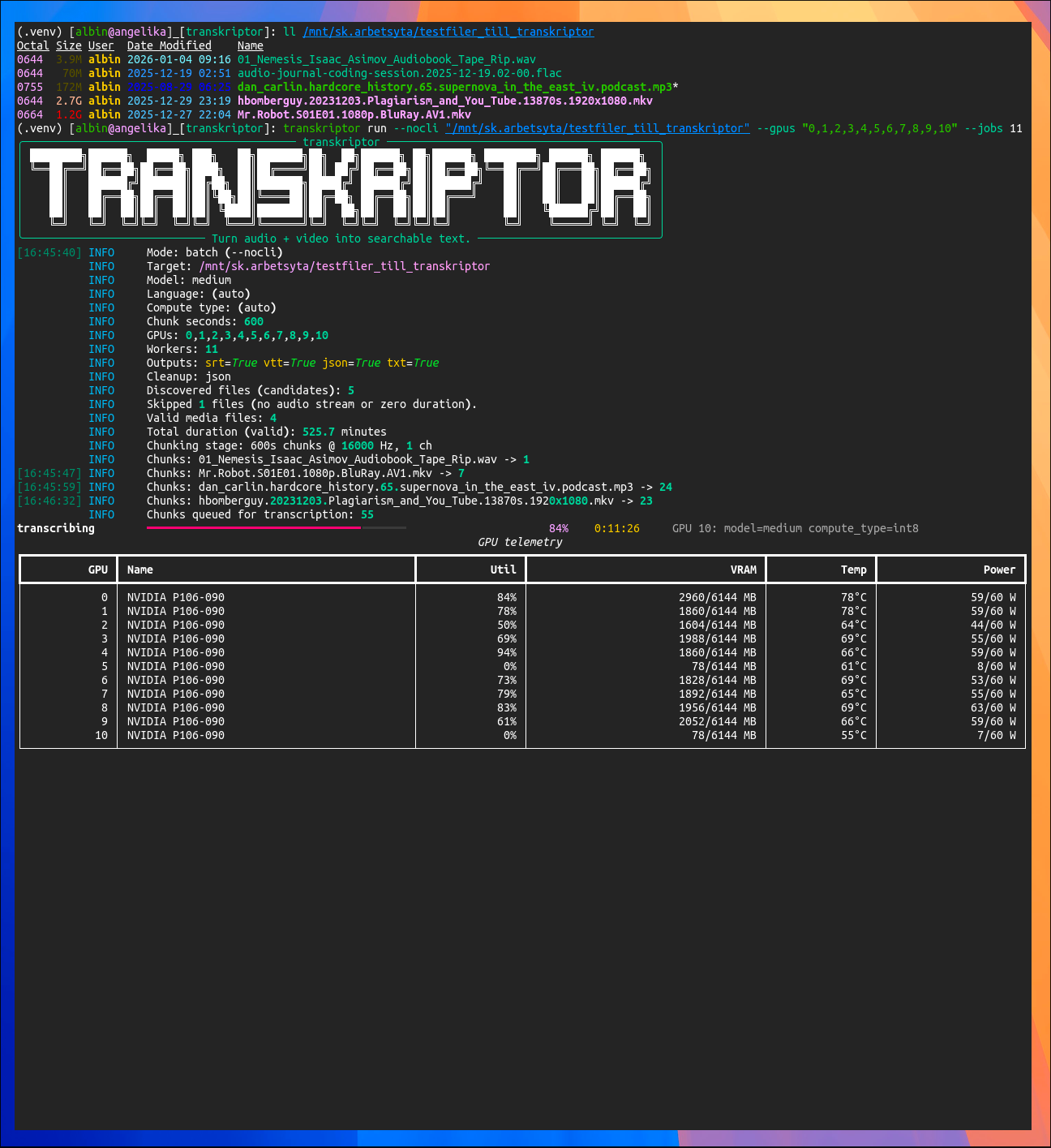
(Authors note: “transkriptor” was the project’s work-in-progress name.)
What it does (today)
Given a file or a directory, it:
- Recursively discovers candidate files (intentionally extension-agnostic)
- Uses
ffprobeto decide if it’s actually “media with audio” - Uses
ffmpegto extract audio and split it into WAV chunks - Transcribes chunks using faster-whisper / CTranslate2
- Runs transcription in parallel across multiple NVIDIA GPUs
- Merges timestamps and exports next to the original:
.srt.vtt.whisper.json.txt(timestamp + tab + text, i.e. grep candy)
And yes: the terminal UX is part of the point. It’s not a silent black box — you get progress bars and (optionally) live GPU telemetry.
The nerdy bits (the fun part)
Extension-agnostic scanning (on purpose)
The file discovery step doesn’t try to guess “video” or “audio” from extensions.
It just finds files (minus your exclude patterns), and ffprobe is the judge.
This makes it happy on messy NAS folders that look like a junk drawer.
Stable per-file workdir (and it’s not dumb)
For each media file, it creates a deterministic workdir next to it:
<media_dir>/.ljudanteckning/<stem>__<ext>__<hash>/
Inside you’ll see:
chunk_00000.wavchunk_00001.wavchunk_00000.whisper.jsonchunk_meta.json
That chunk_meta.json is important: it caches chunking metadata (size, mtime, chunk params).
So reruns can reuse chunks safely unless the file changed or you force a resplit.
One worker = one GPU
Multi-GPU is done the simple, reliable way:
- Spawn processes (
multiprocessingwithspawn) - Bind each worker to a specific GPU via:
CUDA_VISIBLE_DEVICES=<gpu_id>
- Then import and run
faster_whisperinside that worker
Compute type selection is also pragmatic. If you don’t force one, it tries:
int8_float16 → int8 → float16 → float32
(aka: “work on weird old Pascal junk” and “also fly on modern cards”.)
Cleanup policy that doesn’t eat your homework
After export, cleanup is controlled by config:
none: keep chunks + per-chunk JSONjson: delete per-chunk JSON onlyall: delete both chunks and per-chunk JSON
So you can choose between “auditability”, “cache speed”, and “minimal disk usage”.
Install (developer setup)
Debian / Ubuntu (bash)
sudo apt-get update
sudo apt-get install -y git ffmpeg python3 python3-venv python3-pip

# GPU sanity check (install NVIDIA driver/utils if needed)
nvidia-smi

git clone https://github.com/albinhenriksson/ljudanteckning.git
cd ljudanteckning

python3 -m venv .venv
source .venv/bin/activate

python -m pip install -U pip
pip install -e ".[dev,nvml]"

ljudanteckning --help
Arch Linux (fish)
sudo pacman -Syu
sudo pacman -S --needed git ffmpeg python python-pip nvidia-utils

nvidia-smi

git clone https://github.com/albinhenriksson/ljudanteckning.git
cd ljudanteckning

python -m venv .venv
source .venv/bin/activate.fish

python -m pip install -U pip
pip install -e ".[dev,nvml]"

ljudanteckning --help
Quick start
Create a local config:
cp ljudanteckning.example.ini ljudanteckning.ini
Print effective settings:
ljudanteckning show-config
Transcribe a single file:
ljudanteckning run --nocli "/mnt/media/Mr.Robot.S01E01.1080p.BluRay.mkv"
Transcribe a whole directory (recursive):
ljudanteckning run --nocli "/mnt/media"
Multi-GPU (explicit):
ljudanteckning run --nocli --gpus "0,1,2,3" --jobs 4 "/mnt/media"
Force redo if needed:
# recreate WAV chunks
ljudanteckning run --nocli --resplit "/mnt/media"

# redo transcription even if chunk JSON exists
ljudanteckning run --nocli --retranscribe "/mnt/media"
“Ok but where’s the magic?”
The magic is boring, which is exactly what I want.
Once *.txt exists next to your media, searching is just:
rg -n --glob "*.txt" "some phrase you remember hearing" /mnt/media
That’s it. That’s the whole philosophy.
Status / next steps
This is already usable end-to-end: chunk → transcribe → merge → export.
Stuff I want next:
- a nicer interactive/TUI mode (the codebase is already leaning that way)
- better “per media file” progress (not just chunk throughput)
- optional indexing (SQLite/FTS or similar) so you can query everything instantly
- smarter defaults for chunk size vs. throughput vs. accuracy
If you run it and it explodes in an interesting way: open an issue with logs and I’ll happily chase it.
Repo again: https://github.com/albinhenriksson/ljudanteckning